
Remove background
from a GIF.
Remove background from GIF with AI or color removal. Check the animation, adjust a frame when needed, and export GIF, APNG or animated WebP.
or drop a GIF, paste one or a
Check every frame
Preview the animation before exporting.
Free to use
No account, no watermark.
Soft or crisp edges
APNG and WebP keep soft edges.
Clear processing rules
Computer files stay local. Mobile AI uses our server.
Remove background from GIF animations with AI
Choose AI cutout for a person or product against a real scene. It finds the subject in each frame instead of removing one color. Furniture, plants, shadows and uneven lighting usually need this approach. This naturally waving woman was filmed indoors; the original room and the actual transparent result play together so you can see the complete subject on both sides.
To remove background from GIF clips reliably, inspect the first, middle and last frames. Moving fingers, fine hair and motion blur deserve a closer look. A clean opening frame does not guarantee a clean loop. Pause the paired animation to compare the same instant, then replay to check whether the outline changes as the hand moves.
Every frame in this excerpt passed through the current AI separately. The mask from one still image was not reused to manufacture motion. When you remove background from GIF footage of your own, start with the automatic result and correct specific frames only where needed. Longer clips involve more processing and more frames to inspect; a short, well-chosen moment is often easier to finish.
Original GIF

AI cutout

Every frame was processed independently. Pause to compare the same moment.
Remove a background color while checking the details inside
Remove a color is useful when you want to remove background from GIF content with one consistent backdrop. Pick that color from the image, then adjust Tolerance. A lower setting is more selective; a higher setting includes a wider range of similar shades. Clean edges reduces traces of the old color around the outline. It cannot separate a varied scene by understanding the subject.
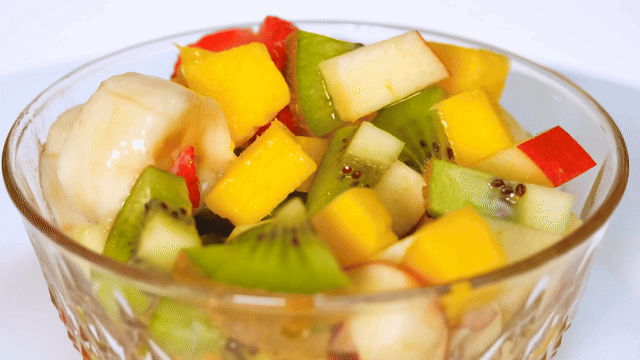
The rotating fruit bowl shows the benefit and the tradeoff on a real white backdrop. The fruit keeps its bright colors, while pale reflections and the transparent glass can resemble the background. After you remove background from GIF product shots, inspect those areas before increasing Tolerance. A glass reflection that matches the backdrop may disappear along with it.
By default, color removal works inward from the image border. Matching patches enclosed inside the subject can remain, while removing the color everywhere also affects those patches. This is a useful distinction when you remove background from GIF artwork or light-colored products. An internal detail connected to the outside is not enclosed, so protection is not guaranteed. Compare the actual settings, then choose the gentlest option that clears enough of the backdrop.
White backdrop
Color removed
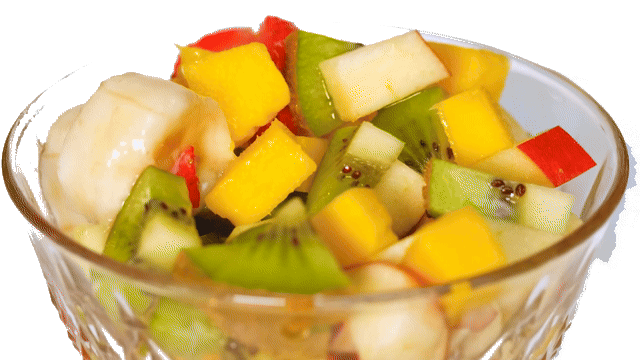
Color removal affects pale glass reflections too. The enlarged banana detail shows what changes inside the subject.
Apply a change to the current frame or the whole animation
Pause and select a frame before deciding how widely a setting should apply. Current frame changes that moment; All frames applies the setting across the animation. This matters when you remove background from GIF clips with a consistent look: a new background on just one frame can flash briefly during playback.
Here the same AI-processed, naturally waving woman appears twice. The left version adds blue only to frame six, while the right adds it to every frame. Use the real frame strip to pause and inspect the difference. When you remove background from GIF sequences, review the scope before export and replay the loop afterward. Brush strokes remain local edits; All frames does not track a painted stroke onto a moving hand or face.
Blue on frame 6 only
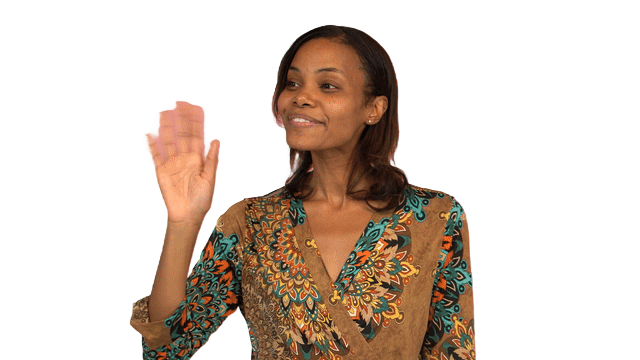
Blue on all frames

Only frame 6 changes on the left; every frame changes on the right. Select a thumbnail to pause both.
Erase or restore a detail on a paused frame
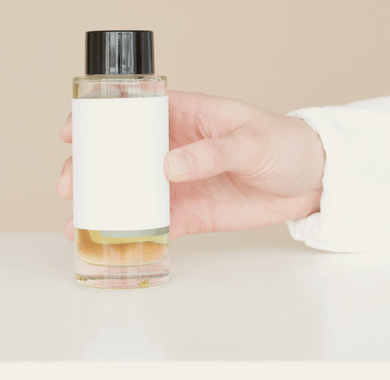
Touch up current frame gives you Erase for unwanted areas and Restore for bringing back original pixels. Use a small brush near a label, rim or fine outline. The product example intentionally erases a small part of the bottle, then restores that area from the original frame. This is a deliberate manual edit, not a hidden AI failure.
After you remove background from GIF frames, inspect the complete image as well as the enlarged detail. Restore can bring back original background pixels too, so avoid a broad stroke across an edge. Replay after editing: a correction that looks fine while paused can still jump if the neighboring frames have a different outline. Repeat only the edits those frames actually need.
Deliberate Erase
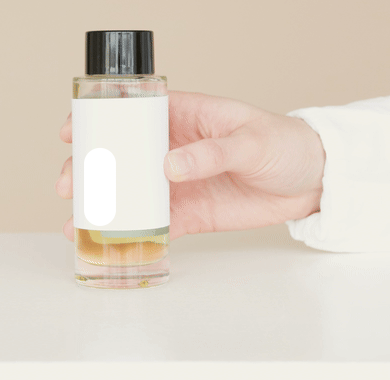
Restore original pixels
The same detail, enlarged
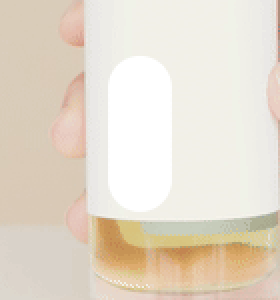
Deliberate Erase

Restore original pixels
Deliberate Erase and Restore on one paused frame. The same bottle detail is enlarged below.
Keep transparency or choose a new background color
When you remove background from GIF content for a website, transparency lets the page show through. For a fixed-background card or presentation, choose a solid color instead. The rotating bouquet uses the same processed frames for every swatch, so the flowers and their movement stay consistent while you compare peach, lavender and mint.
The checkerboard represents transparency and is not downloaded. A selected solid background becomes part of the export. If the downloaded GIF looks white or black, check both the viewer's canvas and your background choice. Place it on a colored surface to verify transparency. Before you remove background from GIF assets for a finished design, knowing the final surface also helps you choose a suitable GIF edge color.
Peach

Each swatch uses the same processed bouquet frames; only the background changes.
Remove background from GIF and compare export edges
Choose GIF when your destination requires it. Each pixel is transparent or opaque, so fine hair can look stepped. APNG and animated WebP support partial transparency for softer transitions. The full animation above the detail crops shows the actual processed portrait. The enlarged images compare the same frame, hair position, background and magnification after real encoding.
If you remove background from GIF content for several destinations, check each export where it will actually appear. Browser playback does not prove that a messaging app, presentation or publishing system accepts that format. Original dimensions also do not mean lossless color: this tool's APNG uses a limited palette, while WebP uses compression. Neither format repairs an incorrectly selected subject.
A pale outline after you remove background from GIF files can come from the old backdrop or from Edge color. GIF blends remaining edge pixels toward that color. Compare white with the plum chosen for this display surface, using the same hair crop. The white edge leaves a pale fringe; the matching plum edge blends into the background. Matching the intended background can reduce a fringe, but does not restore partial transparency. If one animation will sit on several colors, consider APNG or WebP where supported, and inspect the actual result before publishing.
GIF, APNG and WebP

The same frame and hair area after real encoding, without retouching between formats.
Export the animation as numbered PNG frames
Choose PNG frames (ZIP) when you need the sequence in another editor. This coffee example first shows the complete original and actual AI result. The strip below contains the processed frames in order; selecting a thumbnail pauses the preview on that frame. After you remove background from GIF footage, individual PNGs make it easier to inspect a rim, moving reflection or small edge detail.
The ZIP contains one numbered PNG per frame at the animation's dimensions, with transparent pixels preserved when you choose transparency. It contains images, not a playable animation, and carries no frame delays or loop setting. Keep the source for those details. You can remove background from GIF clips once, export GIF, APNG or WebP for playback, and use the PNG sequence for further frame editing.
Original GIF

Processed frames
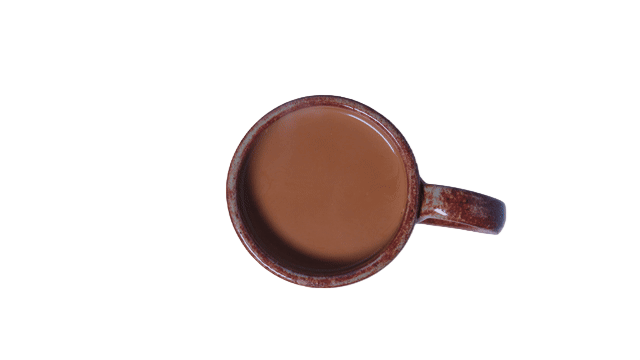
The thumbnails and ZIP contain the actual processed frames in order. The ZIP stores no timing.
What you get
File limits and daily AI allowances are separate. Larger animations also depend on available device memory.
- Price
- Free. No sign-up, no watermark.
- Output
- GIF, APNG or animated WebP; computers also export PNG frames in a ZIP. PNG frames are still images.
- File limits
- 50 MB per file; 6000 px maximum side. No fixed frame-count cap for color removal; device memory still applies.
- Daily AI allowance
- Phones and tablets: 100 AI or subject-protection frames. Computers and ordinary color removal have no daily AI quota.
- Where it runs
- Computer files and ordinary color removal stay in your browser.Phone and tablet AI or subject protection use our server. URL imports are fetched by our server.
- Input formats
- GIF, APNG and animated WebP
How to remove the background from a GIF
- 1
Upload a GIF
Drop the file, paste it or a URL.
- 2
Pick the mode
AI cutout for people and objects, Remove a color for flat backgrounds.
- 3
Export
GIF for compatibility, APNG or WebP for soft edges.
GIF questions
Short answers about frames, edges and formats.
Why does it take longer to remove background from GIF the first time?
The first time you remove background from GIF files with AI, the tool may need to download and prepare its model. Larger frames and longer animations also take more work. You can cancel processing and try a shorter clip; color removal does not need the AI model.
Can I remove background from GIF and change only one frame?
Yes. Select a frame and choose Current frame before changing settings. Erase and Restore edits also belong to the selected frame. All frames applies settings across the animation; it does not copy one brush stroke onto a moving subject.
Can I remove background from GIF files for free?
Yes. Downloads have no watermark and no account is required. Computers have no daily AI-frame quota. Phones and tablets get 100 new AI frames a day; ordinary color removal does not use that quota. File-size and device-memory limits still apply.
Can I remove background from GIF files on my phone?
Yes. Color removal runs on your device. AI cutout and subject protection send reduced-size frame images for server processing and use your daily AI-frame allowance. For longer AI jobs, use a computer. Animated WebP input also depends on browser support.
Does the exported animation keep its timing and looping?
Animated exports retain the animation and loop setting, but very short GIF frame delays are normalized for playback. PNG frames in a ZIP contain no timing or looping information. Preview your exported file in its intended destination.
What are the file limits?
Files can be up to 50 MB, with a maximum 6000-pixel longest side. Computers have no fixed frame-count limit, but longer or larger animations take more time and memory. The workbench estimates long jobs; processing speed depends on your device and settings.
Can I remove background from GIF without uploading it?
On a computer, a local file is processed in your browser. Ordinary color removal also runs locally on phones. Phone AI processing sends frame images to our server. If you import a public image URL, our server retrieves that file for you.
Can this tool remove a video background or make a GIF from photos?
This page processes existing GIF, APNG and supported animated WebP files. It does not accept a video or assemble separate photos into an animation. Convert your source first, then return with an animated file.
Try it with your own GIF
Check the result, choose your background and download when you are ready.
Upload GIFRelated toolsRemove backgroundWhite background remover